

How to Choose a Self-Hosted AI Agent: All 13 Apps on XVer Compared
Compare all 13 self-hosted AI agents on XVer Marketplace across four clear categories, chat channels, licensing, RAM sizing, and security rules.
The XVer team 4 min read 12 min to do Beginner
Also in ภาษาไทย
On this page
Self-hosting an AI agent on your own Cloud Server keeps your assistant online 24/7, keeps workspace files under your control, and lets bots use real chat channels or browsers without tying up your laptop. With 13 AI agent apps ready for 1-click deployment on XVer Marketplace, the fastest way to pick one is by workflow category rather than trial and error.
13 apps
1-click AI Agents on Marketplace
Grouped into 4 clear categories
0 ports
Public ports opened by default
Private SSH tunnels or outbound links
4 GB
Entry-level server RAM
Hourly billing, delete any time
Four categories to narrow down all 13 agents fast#
| Category | Apps included | Best fit |
|---|---|---|
| 1. Multi-agent teams & browser workspaces |  OpenBot,  Rakazo,  CopilotKit OpenBot,  OpenMausBot |
Teams of bots dividing tasks, browsing web pages, filling forms, or running specialist roles |
| 2. Full-featured gateways & self-learning agents |  OpenClaw,  Hermes Agent |
Daily personal assistant with deep memory, reusable skills, and broad messaging support |
| 3. Lightweight low-RAM chat assistants |  nanobot,  ZeroClaw,  PicoClaw |
Fast, minimal Telegram or  Discord assistants without heavy container stacks |
| 4. Specialized messaging & autonomous OS agents |  AstrBot,  QwenPaw,  Moltis,  Agent Zero |
 LINE or Lark integration, voice notes, Markdown memory, or autonomous code execution |
Master comparison table of all 13 AI Agents#
| App | Maintainer & license | Primary interface | Key differentiator | Deep-dive guide |
|---|---|---|---|---|
| OpenClaw |
OpenClaw Foundation (MIT) |
Telegram, Discord, mobile app, web UI |
Full gateway with ClawHub skill registry | OpenClaw vs Hermes |
| Hermes Agent |
Nous Research (MIT) | Terminal, web UI, 20+ chat apps | Writes and improves its own skills from work | OpenClaw vs Hermes |
| OpenBot |
Synthetify Labs (PolyForm Noncommercial) | Desktop, mobile, openbot.run/app |
Uses Codex/Claude Code; zero SSH needed for personal use | OpenBot comparison |
| CopilotKit OpenBot |
CopilotKit (MIT + Intelligence license) | Web UI over SSH (3001) |
Strict approval gates and live browser takeover | OpenBot comparison |
| Rakazo |
Open-source community (Apache-2.0) | Web UI over SSH (5173) |
Agent teams with Team and Private computers | Rakazo guide |
| nanobot |
HKUDS (MIT) | Telegram, Discord, Slack, WhatsApp |
Compact  Python codebase + automation calendar |
Lightweight 3-way |
| ZeroClaw |
ZeroClaw Labs (MIT / Apache-2.0) |
Telegram, Discord, WhatsApp, Matrix, email |
Single binary with safety levels & emergency stop | Lightweight 3-way |
| PicoClaw |
Sipeed (MIT) | Telegram, Discord, Slack, Matrix, web |
Tiny Go binary with web launcher & MCP | Lightweight 3-way |
| Agent Zero |
Agent Zero s.r.o. (MIT) |
Web UI over SSH (5080) + Telegram |
Own OS workspace that writes & executes code | Agent Zero vs OpenMausBot |
| OpenMausBot |
Milind Soni (Apache-2.0) | Web chat over SSH (8799) + CLI |
Sidebar team of bots with approval prompts | Agent Zero vs OpenMausBot |
| AstrBot |
AstrBotDevs (AGPL-3.0) | LINE, Telegram, Discord, Slack, web |
LINE connector + web plugin marketplace |
AstrBot vs QwenPaw vs Moltis |
| QwenPaw |
AgentScope (Apache-2.0) | Telegram, Discord, Slack, Lark, DingTalk |
Editable Markdown memory & workplace apps | AstrBot vs QwenPaw vs Moltis |
| Moltis |
moltis-org (MIT) | Mobile web, Telegram, Discord, WhatsApp |
Single binary with voice input/output & memory | AstrBot vs QwenPaw vs Moltis |
What the self-hosted control panels look like#
Most agents in this catalog pair a server-side daemon with a clean local dashboard for wiring up messaging apps and monitoring sessions, as shown in OpenClaw and Hermes Agent below.
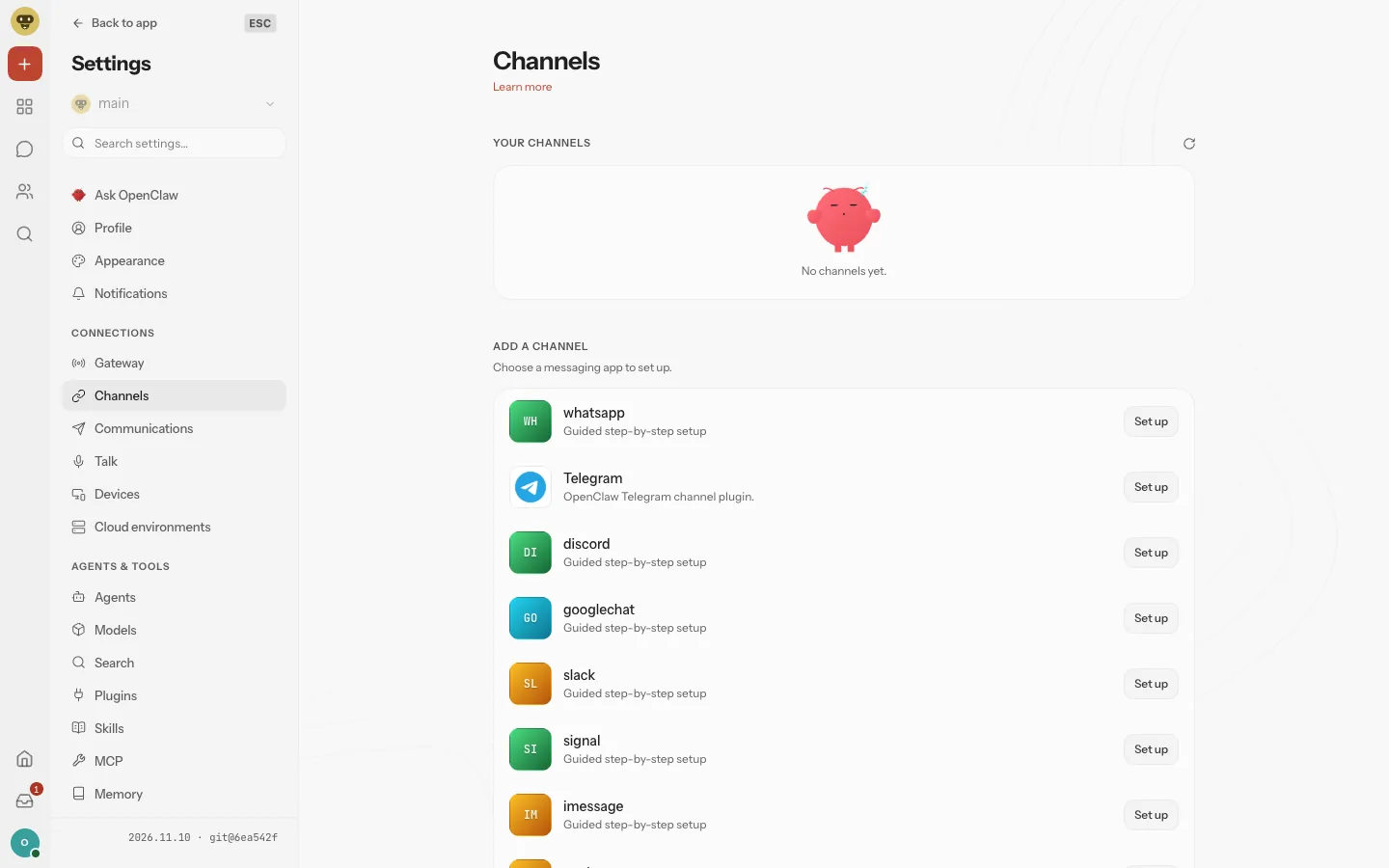 OpenClaw control UI showing messaging channels connected to the Gateway
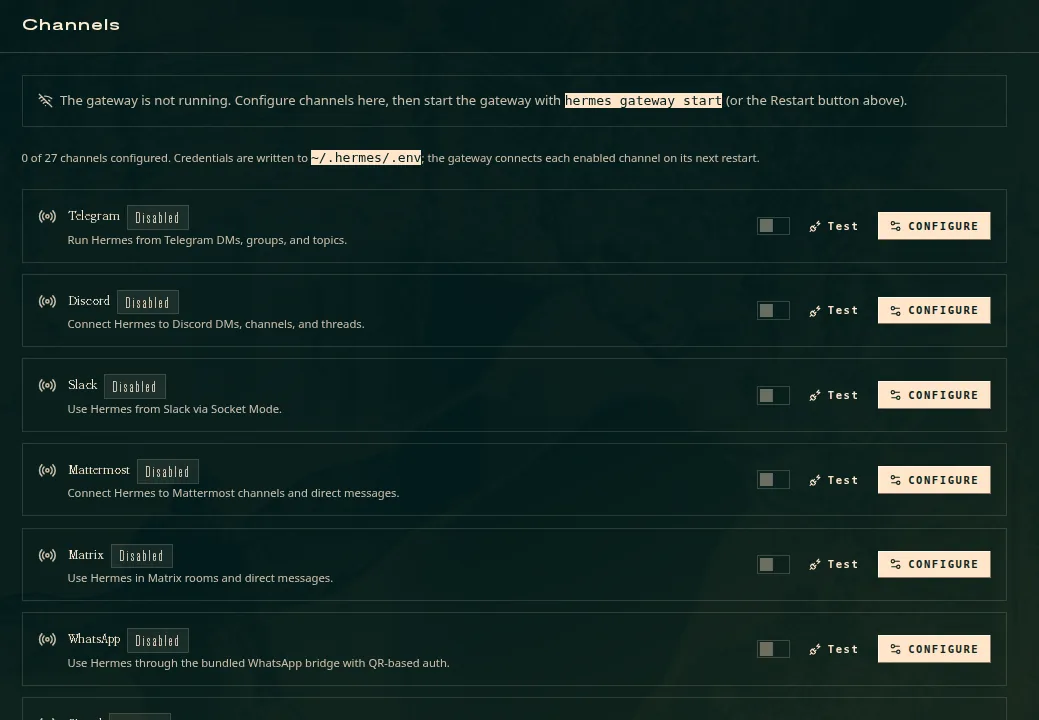 Hermes Agent messaging configuration supporting over 20 chat platforms
Three checks before deploying your agent#
- Verify license terms: Personal setups can run any of the 13 apps; commercial teams should skip noncommercial OpenBot and account for CopilotKit Intelligence licensing.
- Match your real channels: Pick AstrBot for LINE, QwenPaw for Lark/DingTalk, Moltis for voice + WhatsApp, or OpenBot/Telegram bots for mobile-first control.
- Size and cap spend: Start on 2 vCPU, RAM 4 GB, NVMe disk 40 GB, Bandwidth 4 TB and issue a dedicated API key with a hard monthly spending cap.
How billing works across all 13 apps#
Every AI Agent on XVer Marketplace carries zero app markup. XVer bills only for the Cloud Server by the hour, while model API tokens (OpenAI, Anthropic, Google, or local endpoints) are paid directly to your chosen provider. For a realistic monthly token budget breakdown, read how much OpenClaw costs per month.
Looking specifically for terminal coding agents to edit repositories and run tests? Read how to choose among all 20 coding agents on a VPS or browse the full XVer Marketplace.
Frequently asked questions#
Which AI Agent is easiest for a beginner to start with
For a simple personal Telegram or Discord assistant, start with nanobot, PicoClaw, or OpenClaw. For LINE and browser plugin setup, start with AstrBot. For a multi-agent browser team, try Rakazo.
Is a 2 vCPU 4 GB server enough for these agents
Yes for getting started with almost every app on this list. Step up to 4 vCPU and 8 GB RAM when running multiple Private agent computers in Rakazo or heavy concurrent browser automation.
Where does my conversation data go
Chats, workspaces, and memories stay on your own Cloud Server (except CopilotKit OpenBot, which stores conversation memory in CopilotKit Intelligence). Prompts are sent to whichever AI model provider you connect.
Can I test several agents without committing for a month
Yes. XVer bills Cloud Servers strictly by the hour they exist. You can spin up a server for a day, evaluate an agent, and delete the server when done to stop charges immediately.


